Showing posts with label IPT. Show all posts

Thursday, 12 January 2017

IPT v2.3.3 - Your repository for standardized biodiversity data


GBIF is pleased to announce the release of IPT v2.3.3, now available for download from the IPT website.

This version looks and feels the same as 2.3.2 but is much more robust and secure. I'd like to recommend that all existing IPT installations be upgraded as soon as possible following the instructions listed in the release notes.

Additionally, a couple new strategic features have been added to the tool to enhance its potential. A description of these new features follows below.

Improved dataset homepage


Compared with general-purpose repositories such as Dryad or Figshare, the IPT ensures that uploaded biodiversity data gets disseminated in a standardized format (Darwin Core Archive - DwC-A), facilitating wider reuse and enabling the data to be indexed by aggregators such as GBIF.org.

Interoperability comes at a small cost though, as depositors choosing to use the IPT must overcome a learning curve in understanding how to map their data to the Darwin Core standard.

To make this easier for depositors, a new set of Darwin Core Excel templates have recently been released. These new templates provide a simpler solution for capturing, formatting and uploading data to the IPT.

Similarly, users of the standardized data need to understand how to unpack a DwC-A and make sense of the data inside.  

Data Records section - RLS Global Reef Fish Dataset
doi:10.15468/qjgwba
To make this process easier for users, a new Data Records section has been added to the dataset homepage that provides an explanation of what the DwC-A format is with a graphic illustration showing the number of records in each file contained within it.

Overall this advancement will strengthen the IPT as a data repository, which is already capable of assigning DOIs to datasets to make them discoverable and citable. 

Translation into Russian 


Map of IPT installations in Russia - January 2017
Installed in 52 countries around the world, use of the IPT heavily is underrepresented across Russian speaking countries. Therefore to extend the IPT's reach in these areas, the user interface has been fully translated into Russian by a team of volunteer translators with the largest contribution made by Ivan Chadin from the Komi Science Centre of the Ural Branch of the Russian Academy of Sciences.

Map of data published by Russia - January 2017
At the time of writing there were already 18 datasets from Russia published by 5 IPTs installed across Pushchino, Moscow, St Petersburg and the Komi Republic. It will be exciting to watch this number grow over time in part thanks to this enormous volunteer contribution.


Acknowledgements


Once again I'd like to recognize all the volunteer translators that contributed their time and expertise to making this new version available in seven different languages:
  • Sophie Pamerlon (GBIF France) - Updating French translation
  • Yukiko Yamazaki (GBIF Japan (JBIF)) - Updating Japanese translation
  • Daniel Lins (Universidade de São Paulo, Research Center on Biodiversity and Computing - BioComp) - Updating Portuguese translation
  • Néstor Beltrán (Colombian Biodiversity Information System (SiB Colombia)) - Updating Spanish translation
  • Ivan Chadin (Institute of Biology of Komi Scientific Centre of the Ural Branch of the Russian Academy of Sciences), Max Shashkov (Institute of Physicochemical and Biological Problems in Soil Science, Russian Academy of Science) and Artyom Leostrin (Komarov Botanical Institute of the Russian Academy of Sciences (Saint-Petersburg)) - Adding Russian translation 
I'd also like to recognize a few volunteers that helped make significant improvements to the IPT codebase:
  • Bruno P. Kinoshita (National Institute of Water and Atmospheric Research (NIWA)) - Fixed issue #1241, ensuring the IPT can be installed on a server behind a proxy
  • Pieter Provoost (UNESCO) - Fixed issue #1248, improving the IPT's RSS feed
  • Tadj Youssouf (Security researcher, fb.com/oc3f.dz) - Helped address a cross site scripting issue
Although the core development of the IPT happens at the GBIF Secretariat, the coding, documentation, and internationalization are a community effort and everyone is welcome to join in.

I look forward to seeing the IPT's community of volunteers and users continue to grow and hope you can unlock the full potential of this publishing tool and repository.

Wednesday, 20 July 2016

Probably Turboveg's best-kept secret

Turboveg is one of the most widely used software programs used to manage vegetation data. Probably its best-kept secret is that it can export vegetation data in Darwin Core Archive (DwC-A) format, which is a standard format that enables its quick and easy integration with other resources on GBIF.org. Turboveg v2 converts vegetation data into species occurrence data packaged as a DwC-A. Now thanks to an 8 month long collaboration between GBIF and Stephan Hennekens (Turboveg's developer), v3 will convert vegetation data into sampling event data packaged as a DwC-A - a much more faithful and useful representation of the data.

Turboveg

Screenshot of Turboveg v3 prototype
Turboveg is an easy to install and easy to use Windows program for storing, managing, visualizing and exporting vegetation data (relevés). A relevé is a list of the plants in a delimited plot of vegetation, with information on species cover and on substrate and other abiotic features in order to make as complete as possible description in terms of plant community composition and structure.

Today there are about 1500 users of the software worldwide managing more than 1,5 million relevés. Turboveg can export relevés in various file formats, which is useful to enable further analysis. Support for exporting relevés as species occurrence data packaged as a Darwin Core Archive (DwC-A) was added to v2 in 2011. Guidance on how to use this feature can be found in the Turboveg User Manual.

Version 3, due to be released in 2017, will export relevés as sampling event data packaged as DwC-A - a format that more accurately reflects the original data.

Sampling event data

Sampling event data derive from environmental, ecological, and natural resource investigations that follow standardized protocols for measuring and observing biodiversity. This is in contrast to opportunistic observation and collection data, which today form a significant proportion of openly accessible biodiversity data. A good example of sampling data is data coming from vegetation sampling events using the Braun-Blanquet protocol. Because the sampling methodology and sampling units are precisely described the resulting data is comparable and thus better suited for measuring trends in habitat change and climate change.

Sampling event data model

A data model provides the details of the structure of the data. Previously sampling event data couldn't be modelled in a standardized way in Darwin Core due to the complexity of encoding the underlying protocols. Over the past two years, however, GBIF has been working with EU BON and the wider bioinformatics community to develop a data model for sharing sampling event data. In March 2015 TDWG, the international body responsible for maintaining standards for the exchange of biological data, ratified changes that enabled support for modelling sampling event data.

In summary, the de facto data model for sampling event data in Darwin Core consists of three tables: Sampling event, Measurements or Facts and Species occurrences. 

A Sampling event can be associated with many Species occurrences, while a Species occurrence can only be associated to one Sampling event. Similarly, a Sampling event can be associated with many Measurements or Facts. In this way a Sampling event has a one-to-many relationship to both Species occurrences and Measurements or Facts. 

Note additional tables of information can also be added to a Sampling event, such as Multimedia (e.g. to record images of the plot). More information about this preferred data model for sampling event data can be found in the IPT Sampling Event Data Primer.


Sampling event data model for vegetation plot data

Vegetation surveys or relevés produce a wealth of information on species cover and on substrate and other abiotic features in the plot. Species cover can be measured using dozens of different vegetation abundance scales such as the Braun-Blanquet scale or Londo decimal scale to name a couple. To standardize how this information is stored, a custom Relevé table is used instead of the Measurements or Facts table.

This data model for vegetation plot data in Darwin Core consists of three tables: Sampling event, Relevé and Species Occurrence.

A Sampling event can be associated with only one Relevé. The Relevé consists of the most common relevé measurements covering all vegetation layers. Note for each measurement the unit and precision is explicitly defined. A Sampling event can also be associated with many Species occurrences, however, each Species occurrence should specify the vegetation layer where it was found hence the same species can be found within multiple vegetation layers. In this way the vegetation composition can be described for each layer within the plot.

Note that at the time of writing the Darwin Core standard doesn't have the terminology for storing vegetation layers. Therefore a formal proposal has been made to add the new term "layer" to Darwin Core. To standardise how this new term is populated, a custom vocabulary for vegetation layers has also been produced.


Example DwC-A export by Turboveg: Dutch Vegetation Database (LVD)

Fortunately, the Dutch Vegetation Database (LVD) has recently been republished using the new sampling event format and can thus serve as an exemplar dataset. LVD is a substantial dataset published by Alterra (a major Dutch research institute) that covers all plant communities in the Netherlands with more than 85 years of vegetation recording for some habitats. The latest version of this dataset has more than 650 thousand relevés associated with almost 12 million species occurrences.

Alterra uses Turboveg v3 to manage this dataset and export it in the standardized DwC-A format. It is important to note that special care is taken by the software to protect sensitive species: the location of plots, which have red list species observed in them, are obfuscated to a level of 5x5 km squares. Furthermore the software converts all coverage values to the same unit (e.g. species coverage values are converted into percentage coverage) in order to make the data easy to use and integrate with other sources.

Sampling event data on GBIF.org: Dutch Vegetation Database (LVD)

GBIF.org map of LVD georeferenced data
All versions of LVD are imported to the EU BON IPT where they get archived and published through GBIF.org

The 8 month long collaboration between GBIF and Stephan Hennekens culminated in the latest version of LVD being indexed into GBIF.org here. A special and grateful thanks is owed to Stephan for all his hard work to make this happen.

Over the next couple of years GBIF will continue working on enhancing the indexing and discovery of sampling event datasets (e.g. showing events' plots/transects on a map, filtering events by sampling protocol, indexing Relevés, etc.). At least when Turboveg v3 is released in 2017, users can already export their relevés into this new standardized format that represents their data much more faithfully.

Friday, 27 March 2015

IPT v2.2 – Making data citable through DataCite

GBIF is pleased to release IPT 2.2, now capable of automatically connecting with either DataCite or EZID to assign DOIs to datasets. This new feature makes biodiversity data easier to access on the Web and facilitates tracking its re-use.

DataCite integration explained

DataCite specialises in assigning DOIs to datasets. It was established in 2009 with three fundamental goals(1):
                 
  1. Establish easier access to research data on the Internet
  2. Increase acceptance of research data as citable contributions to the scholarly record
  3. Support research data archiving to permit results to be verified and re-purposed for future study

Wednesday, 23 April 2014

IPT v2.1 – Promoting the use of stable occurrenceIDs


GBIF is pleased to announce the release of the IPT 2.1 with the following key changes:
  • Stricter controls for the Darwin Core occurrenceID to improve stability of record level identifiers network wide
  • Ability to support Microsoft Excel spreadsheets natively
  • Japanese translation thanks to Dr. Yukiko Yamazaki from the National Institute of Genetics (NIG) in Japan
With this update, GBIF continues to refine and improve the IPT based on feedback from users, while carrying out a number of deliverables that are part of the GBIF Work Programme for 2014-16.

The most significant new feature that has been added in this release is the ability to validate that each record within an Occurrence dataset has a unique identifier. If any missing or duplicate identifiers are found, publishing fails, and the problem records are logged in the publication report.

This new feature will support data publishers who use the Darwin Core term occurrenceID to uniquely identify their occurrence records. The change is intended to make it easier to link to records as they propagate throughout the network, simplifying the mechanism to cross reference databases and potentially help towards tracking use.

Previously, GBIF has asked publishers to use the three Darwin Core terms: institutionCode, collectionCode, and catalogNumber to uniquely identify their occurrence records. This triplet style identifier will continue to be accepted, however, it is notoriously unstable since the codes are prone to change and in many cases are meaningless for datasets originating from outside of the museum collections community. For this reason, GBIF is adopting the recommendations coming from the IPT user community and recommending the use of occurrenceID instead.

Best practices for creating an occurrenceID are that they (a) must be unique within the dataset, (b) should remain stable over time, and (c) should be globally unique wherever possible. By taking advantage of the IPT’s built-in identifier validation, publishers will automatically satisfy the first condition.

Ultimately, GBIF hopes that by transitioning to more widespread use of stable occurrenceIDs, the following goals can be realized:
  • GBIF can begin to resolve occurrence records using an occurrenceID. This resolution service could also help check whether identifiers are globally unique or not.
  • GBIF’s own occurrence identifiers will become inherently more stable as well.
  • GBIF can sustain more reliable cross-linkages to its records from other databases (e.g. GenBank).
  • Record-level citation can be made possible, enhancing attribution and the ability to track data usage.
  • It will be possible to consider tracking annotations and changes to a record over time.
If you’re a new or existing publisher, GBIF hope you’ll agree these goals are worth working towards, and start using occurrenceIDs.

The IPT 2.1 also includes support for uploading Excel files as data sources.

Another enhancement is that the interface has been translated into Japanese. GBIF offer their sincere thanks to Dr. Yukiko Yamazaki from the National Institute of Genetics (NIG) in Japan for this extraordinary effort.

In the 11 months since version 2.0.5 was released, a total of 11 enhancements have been added, and 38 bugs have been squashed. So what else has been fixed?

If you like the IPT’s auto publishing feature, you will be happy to know the bug causing the temporary directory to grow until disk space was exhausted has now been fixed. Resources that are configured to auto publish, but fail to be published for whatever reason, are now easily identifiable within the resource tables as shown:

If you ever created a data source by connecting directly to a database like MySQL, you may have noticed an error that caused datasets to truncate unexpectedly upon encountering a row with bad data. Thanks to a patch from Paul Morris (Harvard University Herbaria) bad rows now get skipped and reported to the user without skipping subsequent rows of data.

As always we’d like to give special thanks to the other volunteers who contributed to making this version a reality:
On behalf of the GBIF development team, I can say that we’re really excited to get this new version out to everyone! Happy publishing.

Wednesday, 22 May 2013

IPT v2.0.5 Released - A melhor versão até o momento!


The GBIF Secretariat is proud to release version 2.0.5 of the Integrated Publishing Toolkit (IPT), available for download on the project website here.

As with every release, it's your chance to take advantage of the most requested feature enhancements and bug fixes.

The most notable feature enhancements include:
  • A resource can now be configured to publish automatically on an interval (See "Automated Publishing" section in User Manual)
  • The interface has been translated into Portuguese, making the IPT available in five languages: French, Spanish, Traditional Chinese, Portuguese and of course English.
  • An IPT can be configured to back up each DwC-Archive version published (See "Archival Mode" in User Manual)
  • Each resource version now has a resolvable URL (See "Versioned Page" section in User Manual)
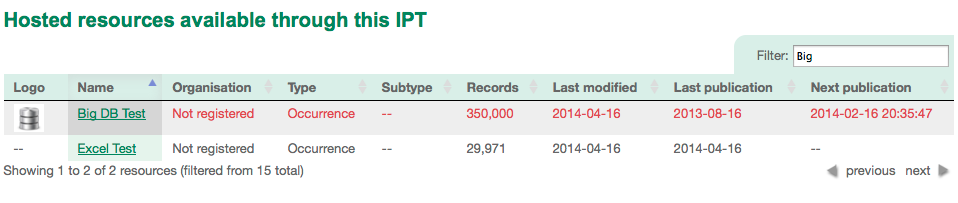
Filterable, pageable, and sortable resource overview table in v2.0.5
  • The order of columns in published DwC-Archives is always the same between versions
  • Style (CSS) customizations are easier than ever - check out this new guide entitled "How to Style Your IPT" for more information
  • Hundreds if not thousands of resources can be handled, now that the resource overview tables are filterable, pageable, and sortable (See "Public Resource Table" section in User Manual) 

The most important bug fixes are:
  • Garbled encoding on registration updates has been fixed
  • The problems uploading DwC-Archives in .gzip format has been fixed
  • The problem uploading a resource logo has been fixed
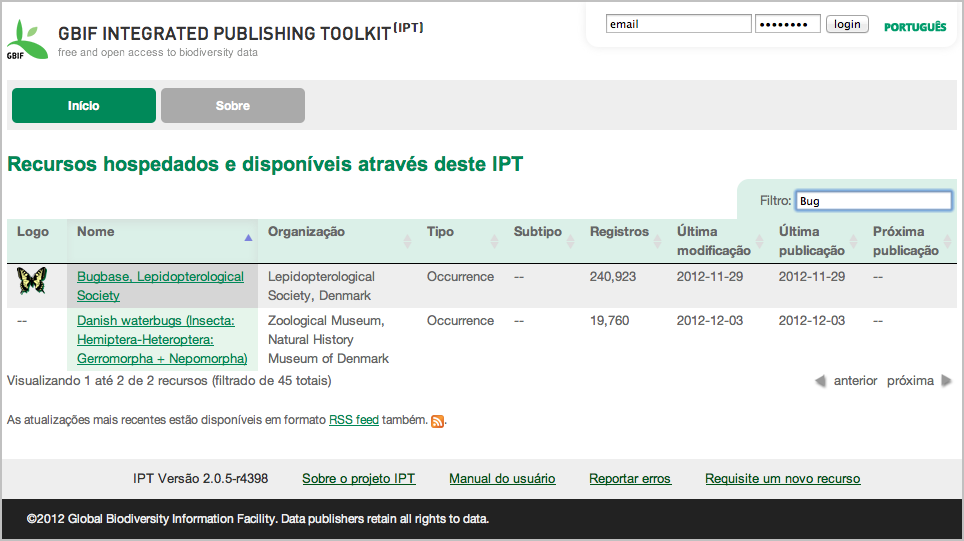
The new look in v2.0.5
The changes mentioned above represent just a fraction of the work that has gone into this version. Since version 2.0.4 was released 7 months ago, a total of 45 issues have been addressed. These are detailed in the issue tracking system.

It is great to see so much feedback from the community in the form of issues especially as the IPT becomes more stable and comprehensive over time. After all, the IPT is a community-driven project and anyone can contribute patches, translations, or have their say simply by adding or voting on issues. 

The single largest community contribution in this version has been the translation into Portuguese done by three volunteers at the Universidade de São Paulo, Research Center on Biodiversity and Computing: Etienne Cartolano, Allan Koch Veiga, and Antonio Mauro Saraiva. With Brazil recently joining the GBIF network, we hope the Portuguese interface for the IPT will help in publication of the wealth of biodiversity data available from Brazilian institutions.   

We’d also like to give special thanks to the other volunteers below:
  • Marie-Elise Lecoq (GBIF France) - Updating French translation
  • Yu-Huang Wang (TaiBIF, Taiwan) - Updating Traditional Chinese translation
  • Dairo Escobar, and Daniel Amariles (Colombian Biodiversity Information System (SiB)) - Updating Spanish translation
  • Carlos Cubillos (Colombian Biodiversity Information System (SiB)) - Contributing style improvements
  • Sijmen Cozijnsen (independent contractor working for NLBIF, Netherlands) - Contributing style improvements
On behalf of the GBIF development team, I hope you enjoy using the latest version of the IPT. 

Wednesday, 17 October 2012

IPT v2.0.4 released


Today the GBIF Secretariat has announced the release of version 2.0.4 of the Integrated Publishing Toolkit (IPT). For those who can't wait to get their hands on the release, it's available for download on the project website here.

Collaboration on this version was more global than ever before, with volunteers in Latin America, Asia, and Europe contributing translations, and volunteers in Canada and the United States contributing some patches. 

Add to that all the issue activity, things have been busy. In total 108 issues were addressed in this version; 38 Defects, 35 Enhancements, 7 Other, 5 Patches, 18 Won't fix, 4 Duplicates, and 1 that was considered as Invalid. These are detailed in the issue tracking system.

So what exactly has changed and why? Here's a quick rundown.

One thing that kept coming up again and again in version 2.0.3, was that users were unwittingly installing the IPT in test mode, thinking that they were running in production. After registering a resource, these users expected to see it show up in the GBIF Registry and ultimately be indexed by GBIF. Frustrated emails were then sent to the GBIF Helpdesk when nothing happened. Sadly the reply from the GBIF Helpdesk was always filled with the same disappointing news: 

"Your resource is actually in the Test Registry therefore it will never be indexed by GBIF. Oh, and you will have to reinstall your IPT using production mode next time and do your resource configuration over again!" 

So to tackle this problem, the setup pages have been improved to make it crystal clear what it means to choose one mode or the other. 


The UI has also been branded when running in test mode to make it even more obvious what mode the IPT is running in.  

  
Now whether or not test mode was chosen accidentally, it can be used to help train administrators how to configure an instance, and to help train users how to publish resources. What was always missing, was a way to transfer configured resources from an IPT in test mode, to one in production. 

I'm happy to say that in 2.0.4, a resource can now be easily transferred between 2 IPTs including all its source files and mappings. Users will be happy to know that they never have to waste time reconfiguring the same resource from scratch. How is this done? Well in short, resource transfer is achieved by uploading an archived IPT resource folder during resource creation - see user manual for full instructions. 

Moving on.. 

With so many publishers opting for the convenience of publishing via the IPT, the GBIF helpdesk has been receiving dozens of requests to replace an existing DiGIR, BioCASE, or TAPIR resource in the GBIF Registry with one coming from their IPT. To facilitate resource migration, another new feature was added in 2.0.4 that allows the IPT to update an existing resource in the GBIF Registry during registration. The change is welcomed most of all by the GBIF helpdesk who bore the brunt of carrying out resource migrations in the GBIF Registry. See User Manual for instructions.

Thanks to the Taiwan Biodiversity Information Facility (TaiBIF)  the IPT interface is now available in Traditional Chinese. That makes the IPT available in a total of 4 languages now including French, Spanish and of course English. 


What else? 

Thanks to a patch from Peter Desmet, download metrics for the Archive, EML, and RTF files can now be tracked via Google Analytics. For IPT admins who aren't already tracking analytics, there are simple instructions in the User Manual. Here's a screenshot showing some metrics from http://ipt-rc.gbif.org For your reference, the "Event Label" is the resource short name in the IPT.

Last but not least, it should be highlighted that the IPT's RSS feed is now updated every time a resource is published. The version number is displayed right beside the resource name, so subscribers can stay on top of the latest changes. Here's a screenshot from my RSS reader pulling from http://ipt.gbif.org/rss.do


And that about wraps up the most important changes in this version. 


As always, we’d like to give special thanks to the volunteer translators for their time and efforts: 
  • Nicolas Noé (Belgian Biodiversity Platform, Belgium) - French 
  • TaiBIF, Taiwan - Traditional Chinese
  • Laura Roldan Gomez, Dairo Escobar, and Daniel Amariles, (Colombian Biodiversity Information System (SiB)) - Spanish
Plus another couple of special mentions are owed to Peter Desmet and Laura Russell who provided an exceptional amount of feedback and suggestions. 

On behalf of the GBIF development team, I hope you enjoy using latest version. 

Monday, 18 June 2012

Launch of the Canadensys explorer

At Canadensys we already adopted and customized the IPT as our data repository. With the data of our network being served by the IPT, we have now built a tool to aggregate and explore these data. For an overview of how we built our network, see this presentation. The post below originally appeared on the Canadensys blog.

We are very pleased to announce the beta version of the Canadensys explorer. The tool allows you to explore, filter, visualize and download all the specimen records published through the Canadensys network.

The explorer currently aggregates nine published collections, comprising over half a million specimen records, with many more to come in the near future. All individual datasets are available on the Canadensys repository and via the Global Biodiversity Information Facility (GBIF) as well. The main functionalities of the explorer are listed below, but we encourage you to discover them for yourself instead. We hope it is intuitive. For the best user experience, please use an up-to-date version of your browser.

Happy exploring: http://data.canadensys.net/explorer

Functionalities

  • The explorer is a one page tool, limiting unnecessary navigation.
  • The default view shows all the data, allowing users to get an overview and explore immediately.
  • Data can be queried by using and combining filters.
  • Filters use smart suggestions, informing the user how often their search term occurs even before they search.
  • The exact number of results is displayed, including the number of georeferenced records.
  • The map view displays all georeferenced records for the current query, has different base layer options and can be zoomed in to any level.
  • Points on the map can be clicked for more information.
  • The table view displays a sortable preview of the records in the current query.
  • Records in the table can be clicked for more information in the same way as on the map.
  • The number of columns in the table responds to the screen width and can be controlled by the user in the display panel.
  • Data for the current query can be downloaded as a Darwin Core archive. There is no limit on the number of records that can be downloaded.
  • Users can download the data by providing their email address. Once the download package is generated, the user receives an email with a link to the data, information regarding the usage norms and a suggested citation.
  • The interface and emails are available in French and English.

As this is a beta version, you may encounter issues. Please report them by clicking the feedback button on the right, which will open a report form.

Technical details

The Canadensys explorer was developed using the following open source tools:

Thursday, 19 January 2012

BioCASe now producing DarwinCore Archives

Guest post from Jörg Holetschek, Botanic Garden and Botanical Museum Berlin-Dahlem.

The traditional way of sharing occurrence data with GBIF has been web-service-based for years. Data publishers have used one of the existing provider software packages (DiGIR, BioCASe or TAPIR Link) to expose their data as a DiGIR-, BioCASe- or TAPIR-compliant web service. Biodiversity networks such as GBIF used harvesters to crawl and index the records published by these services, an approach that works fine for small and medium-sized datasets, but runs into difficulties when record numbers hit the millions: Harvesting can take days and puts a heavy load on both the publisher and the crawler.

To overcome this, GBIF recently introduced DarwinCore Archives for storing all information of a dataset to be published in a single file. GBIF directly ingesting this file eliminates the time-consuming back-and-forth communication between data provider and harvester, speeding up the process and reducing load for both sides. GBIF’s IPT allows easy creation of such DarwinCore Archives and is a good option for providers that have already used the DarwinCore standard in the past or that want to share rather slim observation data.

However, sixty-two of GBIF’s data publishers are currently using BioCASe. In contrast to DarwinCore, BioCASe and its associated data standard ABCD are targeted mainly at rich data originating from specimens of natural history collections (even though it can be used for any type of occurrence data, including observations). Many of the BioCASe data providers also share their data with special interest networks such as GeoCASe, the DNA-Bank Network, or the EDIT Specimen network, all of them relying on BioCASe web services. Switching to the IPT and the associated DarwinCore standard is not an option for them.

For this reason, we decided to extend the BioCASe Provider Software with a feature to create DarwinCore Archives. This allows providers to continue using the rich ABCD schema (or one of its extensions) for the specific networks they’re connected to while using DarwinCore Archives to share their data with GBIF. In order to combine the richness of ABCD with the efficiency of downloadable archives, we created a hybrid in-between, the so called ABCD Archives, which can be used instead of the BioCASe web service for harvesting purposes (see figure below).


The first step – creating the ABCD archive – is implemented natively in the Provider Software in Python. The second step – transforming the ABCD archive into one or several DarwinCore archives – is done by Pentaho Data Transformation, an open source library also known as Kettle. In the current version 3.0, the transformation step is a stand-alone command-line application that can be downloaded separately; ultimately, it will be bundled with the Provider Software and integrated into the user interface.

The latest version of the Provider Software and the DarwinCore Creator can be downloaded from the BioCASe website. A detailed documentation of the new archiving features can be found in the PyWrapper Wiki. The wiki also stores a sample ABCD archive and a sample DarwinCore archive created by BioCASe.

Thursday, 8 December 2011

Updating a customized IPT

This post originally appeared on the Canadensys blog and is a follow-up of the post Customizing the IPT.

As mentioned at the very end of my post about customizing the IPT, I face a problem when I want to install a new version of the GBIF Integrated Publishing Toolkit: installing it will overwrite all my customized files! Luckily Tim Robertson gave me a hint on how to solve this: a shell script to reapply my customization.

Here's how it works (for Mac and Linux systems only):

Comparing the customized files with the default files

First of all, I need to compare my customized files with the files from the new IPT. They might have changed to include new functionalities or fix bugs. So, I installed the newest version of IPT on my localhost, opened the default files and compared them with my files. Although there are tools to compare files, I mostly did this manually. The biggest change in version 2.0.3 was the addition of localization, for which I'm using a different UI, so I had to tweak some things here and there. It took me about 3 hours until I was satisfied with the new customized IPT version on my localhost.

I also subscribed to the RSS of the IPT Google Code website, to be notified of any changes in the code of "my" files, but I was just using this as a heads-up for coming changes. It is more efficient to change everything at once, when a stable version of IPT is out.

Setting up a file structure

This is how we've organized the files on our server. I've created a folder called ipt-customization, which contains all my customized files. That way, they can never be overwritten by a new IPT installation, which gets deployed in webapps. The folder also contains a script to apply the customization and a folder to backup the default files currently used by IPT.

  • ipt-data
  • webapps
    • ipt
  • ipt-customization
    • backup-default
    • apply-customization.sh
    • revert-customization.sh
    • header.ftl
    • header_setup.ftl
    • menu.ftl
    • footer.ftl
    • main.css
    • custom.js

Creating the shell script

The apply-customization.sh script works in two steps:

  1. Backup the default files, by copying them from IPT to the folder backup-default. The script will ask if I want to overwrite any previously backed up files. The last part is important if I'm running the script several times. In that case I do not want to overwrite the backups with the already customized files.
  2. Overwrite the files currently used by IPT with the customized files, by copying them from my ipt-customization folder to the correct folder in IPT
# backup files of new IPT installation
cp -i ../webapps/ipt/WEB-INF/pages/inc/footer.ftl ../ipt-customization/backup-default/
cp -i ../webapps/ipt/WEB-INF/pages/inc/header_setup.ftl ../ipt-customization/backup-default/
cp -i ../webapps/ipt/WEB-INF/pages/inc/header.ftl ../ipt-customization/backup-default/
cp -i ../webapps/ipt/WEB-INF/pages/inc/menu.ftl ../ipt-customization/backup-default/
cp -i ../webapps/ipt/styles/main.css ../ipt-customization/backup-default/

# apply customization
cp footer.ftl ../webapps/ipt/WEB-INF/pages/inc/
cp header_setup.ftl ../webapps/ipt/WEB-INF/pages/inc/
cp header.ftl ../webapps/ipt/WEB-INF/pages/inc/
cp menu.ftl ../webapps/ipt/WEB-INF/pages/inc/
cp main.css ../webapps/ipt/styles/
cp custom.js ../webapps/ipt/js/

I also created a script revert-customization.sh, to revert the customization to the default IPT, in case something is broken. It moves the backed up files back to IPT:

# revert customization
cp backup-default/footer.ftl ../webapps/ipt/WEB-INF/pages/inc/
cp backup-default/header_setup.ftl ../webapps/ipt/WEB-INF/pages/inc/
cp backup-default/header.ftl ../webapps/ipt/WEB-INF/pages/inc/
cp backup-default/menu.ftl ../webapps/ipt/WEB-INF/pages/inc/
cp backup-default/main.css ../webapps/ipt/styles/
rm ../webapps/ipt/js/custom.js

Running the script

From the command line, I login to my server, navigate to the folder ipt-customization and make my script executable:

chmod +x apply-customization.sh

I only have to do this the first time I want to use my script. From then on I can use:

sh ./apply-customization.sh

To execute the script and customize my new version of IPT!

Monday, 25 July 2011

Customizing the IPT

One of my responsibilities as the Biodiversity Informatics Manager for Canadensys is to develop a data portal giving access to all the biodiversity information published by the participants of our network. A huge portion of this task can now be done with the GBIF Integrated Publishing Toolkit version 2 or IPT. The IPT allows to host biodiversity resources, manage their data and metadata, and register them with GBIF so they can appear on the GBIF data portal, which are all targets we want to achieve. Best of all, most management can be done by the collection managers themselves.

I have tested the IPT thoroughly and I am convinced the GBIF development team has done an excellent job creating a stable tool I can trust. This post explains how I have customized our IPT installation to integrate it with our other Canadensys websites.


Background

Our Canadensys community portal is powered by WordPress (MySQL, PHP), while our data portal - which before the IPT installation only consisted of the Database of Vascular Plants of Canada (VASCAN) - is a Tomcat application. We are using different technologies because we want to use the most adequate technology for a certain website. WordPress (or Drupal for that matter) is an excellent and easy-to-use CMS, perfect for our community portal, but not suitable for a custom made checklist website like VASCAN. To the user however, both websites look the same:


We do this by using the same HTML markup and CSS for both websites. If you want to learn HTML and CSS, w3schools provides excellent tutorials.

The HTML markup defines elements on a page (e.g. header, menu, content, sidebar, footer) and the CSS stylizes those elements (e.g. their position and color). The CSS is typically stored as one file (e.g. style.css) which is referenced in the <head> section of a page. For dynamic websites, the HTML is typically stored as different files, one for each section of a page (e.g. header.php, sidebar.php). Those files are combined as one page by the server if a page is requested. That way, changing a common element on all pages of a website (e.g. the header) can be done by changing just one file.

All of this also applies to the IPT. Here's how the IPT looks like without CSS:


Attempt 1 - Editing the CSS and logo

My first attempt at customizing the IPT was at the Experts Workshop in Copenhagen, by changing the CSS and logo only, which you can find in the /styles folder of your IPT installation:

/styles/main.css
/styles/logo.jpg

In 15 minutes, my IPT was Canadensys red and had a custom logo:


Attempt 2 - Editing the FreeMarker files

Even though my IPT now had its own branding, it was still noticeably different from the other Canadensys websites. The only way I could change that, was by editing the HTML as well. Luckily, the sections I wanted to change were all stored as FreeMarker files in the /inc folder:

/WEB-INF/pages/inc/header.ftl - the <head> section
/WEB-INF/pages/inc/menu.ftl - the header, menu and sidebar
/WEB-INF/pages/inc/footer.ftl - the footer
/WEB-INF/pages/inc/header_setup.ftl - the header during installation

I incorporated the HTML structure I use for the VASCAN website into menu.ftl (including the header, menu, container and sidebar), making sure I did not break any of the IPT functionality.

I started doing the same with main.css by replacing chunks of now unused IPT CSS with CSS I copied over from VASCAN, but I quickly realized that this wasn't the best option. Doing so would result in 2 CSS files: one for VASCAN and one for IPT, even though both web applications are under the same domain name with a lot of shared CSS. It would be easier if I only had to maintain a single stylesheet, used by both applications.

Attempt 3 - One styles folder for the data portal

I created a /common/styles folder under ROOT, where I placed my single common data portal stylesheet: /common/styles/common.css. This would be the CSS file I could use for IPT and VASCAN. I did the same for my favicon: /common/images/favicon.png.

I added a reference to both files in the header.ftl of my IPT (and VASCAN):

<link rel="stylesheet" type="text/css" href="${baseURL}/styles/main.css">
<link rel="stylesheet" type="text/css" href="http://data.canadensys.net/common/styles/common.css">
<link rel="shortcut icon" href="http://data.canadensys.net/common/images/favicon.png">

As you can see on the first line, I kept the reference to the default IPT stylesheet: ${baseURL}/styles/main.css (it's perfectly fine to reference more than one CSS file). This is where I would keep all the unaltered (=default) IPT CSS. In fact, I'm not removing anything from the default IPT stylesheet, I'm only commenting out the CSS that is unused or conflicting:

/* Unused or conflicting CSS */

The advantage of doing so, is that I now easily can compare this commented file with changes in the stylesheet of any new IPT version.

After I had done everything, my IPT now looked like this:


My IPT is now sporting the Canadensys header, footer and sidebar (only visible when editing a resource), making it indistinguishable from the other Canadensys websites. It is also using a more readable font-size (13.5px) and a fluid width.

Closing remarks

I have (re)designed quite a lot of websites, and very often I have been so frustrated with the HTML and CSS that I just started over from scratch. I didn't have that option here and it wasn't necessary either. I would like to thank the GBIF development team for creating such an easily customizable tool, with logical HTML and CSS. As a reminder, the whole customization has been done by editing only 5 files (links show default files):

/styles/main.css (custom file)
/WEB-INF/pages/inc/header.ftl
/WEB-INF/pages/inc/menu.ftl
/WEB-INF/pages/inc/footer.ftl
/WEB-INF/pages/inc/header_setup.ftl

Important: Remember that installing a new IPT version will overwrite all the customized files, so make sure to back them up! I will try to figure out a way to reapply my customization automatically after an update and post about that experience in a follow-up post. In the meantime, I hope that this post will help others in the customization of their IPT.

Wednesday, 13 April 2011

Can IPT2 handle big datasets now?

One of IPT1's most serious problems was its inability to handle large datasets. For example, a dataset with only half a million records (relatively small compared to some of the biggest in the GBIF network) caused the application to slow down to such a degree that even the most patient users were throwing their hands up in dismay.
Anyways, I wanted to see for myself whether the IPT’s problems with large datasets have been overcome or not in the newest version: IPT2.

Here’s what I did to run the test: First, I connected to a MySQL database and used a “select * from … limit …” query to define my source data totalling 24 million records (the same number of records as a large dataset coming from Sweden). Next, I mapped 17 columns to Darwin Core occurrence terms and once this was done I was able to start the publication of a Darwin Core Archive (DwC-A). The publication took just under 50 minutes to finish, processing approximately 500,000 records per minute. Take a look at the screenshot below that was taken after the successful publication. Important to note is that this test was run on a Tomcat server with only 256MB of memory. In fact, special care was taken during IPT2 design to ensure it could still run on older hardware that didn’t have a lot of memory. It’s worth noting that this is one of the reasons why IPT2 is not as feature rich as the IPT1 was.


So just how does the IPT2 handle 24 million records coming from a database while running on a system with so little memory? The answer is that instead of returning all records at once, they are retrieved in small result sets only having about 1000 records each. These results sets are then streamed to file and immediately written to disk. The final DwC-A generated was 3.61GB in size, so some disk space is obviously needed too.

Therefore in conclusion I feel that he IPT2 has successfully overcome its previous problems handling large datasets. I hope other adopters will now give it a shot themselves.