Sunday, 21 August 2011

Configuring Drupal and some modules for ticketing emails

We at the Secretariat receive enquiries via helpdesk[at]gbif[dot]org, portal[at]gbif[dot]org and info[at]gbif[dot]org, everyday, or I would say, almost every hour. Some of them are provider-specific questions that need special attention from staff, while some others are FAQs. We have been thinking about better managing questions/issues, so by adding a little bit structure in the collaborative workflow, we can:

1. Make sure questions are answered with satisfaction; 2. Estimate how much man hours have been spent, or evaluate performance; 3. Improve efficiency on helpdesk activities.

To achieve these, we need softwares that meet these requirements:
1. Case management for incoming emails;
2. A Q&A cycle should be completed by solely using email. Web forms are good but not necessary in the beginning;
3. Easy configured knowledge base essays;
4. Graphical reports shows the helpdesk performance;
5. Automatic escalation of case status.

We looked for options from Open Source Help Desk List. While most of the sounding choices are tailored for software development cycle, some are commercial packages/services that indeed designed for enterprise help desk needs. While evaluating a few of those packages, I also found with Drupal and some modules, a solution that just meets our need is pretty out-of-box ready. The result is quite convincing and I can imagine the transition won't require too much learning of my colleagues.

Here is the recipe.

Materials and methods:

1. A mail server. All right I admit this is not something easy if you're not a system administrator. We use Dovecot to provide IMAP access to emails.
2. A Drupal installation. Installation instructions are here. As a wimp I choose version 6.
3. The Support module. Downloadable at http://drupal.org/project/support.
support_deadline, support_fields, support_timer, support_views, support_token, and support_nag are relevant modules that fit our purposes.
4. The CCK module. Downloadable at http://drupal/project/cck.
5. The Views module. Downloadable at http://drupal/project/views.
6. The Google Chart module. Downloadable at http://drupal.org/project/chart. Not "charts", which is a different module.
7. The Date module. Downloadable at http://drupal.org/project/date.
8. The Admin Menu module, for your administrative pleasure. Downloadable at http://drupal.org/project/admin_menu.
9. The Views Calc module, required by Support modules. Downloadable at http://drupal.org/project/views_calc.
10. Download all necessary modules to [drupalroot]/sites/all/modules directory. Enable them at [baseURL]/admin/build/modules.
11. You should see a "support ticketing system" menu by now. You need to

  1. Add an email client with an email account you set on the dovecot mail server;
  2. You probably want to change the email template at [baseURL]/admin/support/settings/mail;
  3. Go through the general settings of the ticketing system at [baseURL]/admin/support/settings.
12. Send some testing emails to the testing email address.
13. Visit [baseURL]/admin/support/clients/1/fetch, see if the system retrieve email and create tickets successfully.

14. After more testing emails have been sent to the address and fetched. You can visit [baseURL]/admin/support/charts.

These are just some facets of my explorations so far. Some details are not covered, like permissions in Drupal. Probably a newbie would need a crash course of Drupal to start, but after that things will be easier and faster.

Friday, 12 August 2011

Using C3P0 with MyBatis

The problem

In our rollover process, which turns our raw harvested data into the interpreted occurrences you can see on our portal, we now have a step that calls a Web Service to turn geographical coordinates into country names. We use this to enrich and validate the incoming data.

This step in our process usually took about three to four hours but last week it stopped working all together without any changes to the Web Service or the input data.

We've spent a lot of time trying to find the problem and while we still can't say for sure what the exact problem is or was we've found a fix that works for us which also allows us to make some assumptions about the cause of the failure.

It is a project called geocode-ws and it is a very simple project that uses MyBatis to call a PostgreSQL (8.4.2) & PostGIS (1.4.0) database which does the GISy work of finding matches.

Our process started out fine. The first few million calls to the Web Service were fine and returning reasonably fast but then at the end the process slowed down until it came almost to a complete stop with response times of over 10 minutes. That's when our Hadoop maps timed out and failed.

With hindsight we should have come to our final conclusion much earlier but it took us a while.

Looking for the problem

We've looked at the PostgreSQL configuration and tweaked it a lot. We added a lot more logging and we've made sure to log any long running statements (using the log_min_duration_statement option). We also made sure that our memory settings are sensible and that we don't run out of memory. Looking at io- and vmstats as well as our Cacti monitoring we could see that this wasn't the case though. PostgreSQL didn't seem to be the problem.

We also looked at the OS configuration itself as well as the connectivity between our Hadoop cluster and this Tomcat and PostgreSQL server but couldn't find the problem either.

Then we began improving our Web Service and implemented a JMX MBean to get more detailed information about the process. While our changes should have improved the code base they didn't fix the problem. Finally we enabled GC logging on our Tomcat server (something we should have done much earlier and we will probably do by default for our servers in the future). We didn't do it earlier because the Web Service didn't experience any symptoms of memory leak issues before and we didn't change anything there. It hadn't even been restarted in a while.

But as it turned out the problem was garbage collection. Unfortunately I can't provide pretty graphs because I've overwritten the GC logs but it was very easy to see (using the awesome GCViewer) a typical pattern of minor collections not reclaiming all space and growing memory usage up until the point where almost no memory could be reclaimed and most of the time was spent in Garbage Collection. We found the problem! This explained our time outs.

It still doesn't explain what was leaking though. And having spent that much time on it we quickly gave up trying to find the problem. We suspect some kind of combination between the MyBatis Connection Pool, the PostgreSQL JDBC driver and our configuration.

Our workaround (the MyBatis & C3P0 part)

So we looked around for other connection pools for use with MyBatis but unfortunately we couldn't find a ready made thing. There are implementations in the MyBatis-Guice project but they can only be used with the Annotation based configuration and we're using XML.

We ended up writing our own implementation of a C3P0 DataSourceFactory and it turned out to be very very easy: It is just one class (JavaDoc here) with one line of code in it.

This not only solved our apparent memory leak but the performance increased by a factor of two to three as well. We haven't had a problem with our setup since.

Conclusion

We didn't have the time to find the real problem but we found a solution that works for us. I suspect had we gone about this better we might have found the problem a lot sooner and perhaps identified the real reason for it.
  • Enable GC logging!
  • Enable JMX for Tomcat and set up your applications with useful metrics and logging
  • Even though the use of Profilers is heavily disputed they can often help. We've found YourKit to be excellent
  • Try to follow a logical route, change only one thing at a time, mock things to find a problem
  • Monitor and graph your systems

Wednesday, 3 August 2011

Indexing occurrences data - using Lucene technology

The GBIF Occurrence Index collects, stores and parses data gathered from different sources to provide a fast and accurate access to biodiversity occurrence data. The purpose of having a GBIF Index is optimize speed, relevance and performance of search functionalities that will be implemented by the new GBIF portal architecture.

Currently, GBIF has been providing search functionalities in its Data Portal supported in a semi-denormalized index relational database design, which allows find occurrence information by specifying filters to refine the expected results. That design was envisioned to support use cases of the actual GBIF Data Portal (a Web application); for the next generation of the GBIF platform, a new set of requirements must be achieved and is possible that the current index will not be able to support them, the most relevant of those requirements are: scheduling of batch exports, full text search, realtime faceted search and probably new schemas of data sharing with other biodiversity networks.

For implementing this new Occurrence Index, several technologies are under evaluated, each technology taken into considerationfor specific features that make them an attractive option, those are:
TechnologyDescription
PostgreSQLThis relational data base contains several features that worth evaluate: query optimization for JOIN-like queries, flexible key-value store, partial indices and multicolumn indices
Lucene IndexAt least four options are available for this implementation: pure Lucene Index, Katta, Apache Solr and ElasticSearch
MySQL This is the current implementation of the index, a evaluation could help to determine if this technology will be able to support new use cases
Key-value systemsSeveral schema-less data stores are available: CouchDB, Mongo, PostgreSQL hstore. The main concern about these technologies is their capabilities to handle a considerable amount of records
In this post will show some preliminary results in the evaluation of Lucene-based indices, specifically: Lucene as itself, Katta, Apache Solr and ElasticSearch. The analysis will keep apart two concerns (in this post only the index creation is cited):
  • Index creation, means how the index is created, split (in shards) and merged if necessary. 
  • Index use, refers in how the index performs in terms of usability (queries and search patterns), performance (response time) and througput.

Index Creation

Three scenarios were considered to the index creation phase:
  • Single process - n Indices: In this case a single process creates n-shards, the input data are split evenly; an IndexWriter is created for each shard. The case of n = 1 is considered part of this scenario, the # of shards is a parameter defined by the user, and is equal to the # of expected shards at the end of the process.
  • N threads - n Indices: The IndexWriter is a thread safe class, so it can be shared by several threads in order to create a single Index. The # of shards is defined by the user and internally is used to define the # of IndexWriters.
  • Distributed Index creation: in this case the index is created by splitting the input data into N shards, each shard is assigned to one process that contains a single IndexWriter which is responsible for the index creation.

Single process index creation

The process followed for this scenario is pretty straightforward:
  • The input is a row delimited file and each column is separated by a special character ('/001' in our case.
  • The # of shards input defines the number IndexWriters (only one IndexWriter can be opened for a Lucene Index).
  • Each row represents a Lucene document and is stored using one of the available index writers.
  • If multiple indices were created, at the final step those are merged into a single index (using "IndexWriter.addIndexesNoOptimize")
This process was tested using a 100 millions of records file. The entire process took 9200821 milliseconds (= 9200.821 seconds = 153.347016666666667 minutes = 2.555783611111111 hours) to finish. Some optimizations were implemented for this process, worth mention that the same sort of optimizations were applied for the multithread scenario:
  • Re-use the IndexWriter in multiple threads
  • Re-use the org.apache.lucene.document.Document and org.apache.lucene.document.Field instances. The Lucene fields are created in a static block and its value is changed for each new Document, then the document is added to the index. The intention of this is avoid the objects to be garbage collected.
      //Initialization
      static {
        for (int i = 0; i < accFieldsValues.length; i++) {
          fields[i] = new Field(accFieldsValues[i].name(), "", Store.YES, Index.ANALYZED);
        }
      }
     ...
     //Sets the field value
     fields[fieldsCount].setValue(stringTokenizer.nextToken());
     ...
     //Adds the same document instance with different values
     indexWriter.addDocument(doc);
    
  • The compound file format is turned off, this reduces the amount of files opened at the same time.
  • IndexWriter.autocommit is set to false: since the index doesn't provide searching during the creation time, this feature can be disable.
  • The flush is done by RAM, and the RAM usage is maximized:
     
    LogByteSizeMergePolicy logByteSizeMergePolicy = new LogByteSizeMergePolicy(); logByteSizeMergePolicy.setMergeFactor(mergeFactor);
    ...
    indexWriterConfig.setRAMBufferSizeMB(bufferSize);
    
  • Every N documents a entry is written in a log in order to notify the overall progress.

Multithreaded Index Creation

In terms of optimizations applied this scenario is very similar to the "Single process" scenario. However, the process is very different in terms of steps and the resulted index:
  • The input is a row delimited file and each column is separated by a special character ('/001' in our case).
  • The number of rows of the input file is known and is passed as input parameter.
  • The input file is split evenly in intermediate files, each file is assigned to a thread which will read it to create a Lucene Index.
  • The intermediate files are deleted after each index is created.
  • Depending of the number of shards desired , the indices are merged in smaller set of indices.
This process was run using: a pool of 50 threads and an input file with 100 million of rows. The execution time is detailed in the next table:
Phase Time
Slicing (split the input file and distribute it in the threads)1045948ms == 17.43 minutes
Indices creation6890988 == 114.8498 minutes
Total time 132.2798 minutes = 2.204663333333333 hours

Katta for Index Creation

Katta is a distributed storage of indices, currently supports 2 types of indices: Lucene and Hadoop MapFiles. It uses ZooKeeper to coordinate the index creation, replication and the search across the nodes.
Main relevant features
  • An Katta index is basically a folder containing sub-folders (shards)
  • The client-node communication is implemented using HadoopRPC
  • Supports distributed scoring, each search query requires two network roundtrips: get document frequencies in all shards and second perform the query.
  • Provides functionality to merge indices (though is not a very comple task to implement using standard Lucene libraries)
Relevant issues found
  • Documentation is not extensive and lacks of necessary detail.
  • Small community and the development is very low: last commit was done in 2009-04-2.
  • Doesn't provide any help to create the indeces, index sharding must be done prior to import them into Katta.
Test environment configuration
  • A cluster of 4 Katta nodes in 2 servers was used.
  • The index was split in 8 shards.
  • The master configuration is replicated in each node using passphraseless ssh access between master and nodes.
  • The ZooKeeper server was embedded into the Katta master node.
     katta.zk.properties (file) ==>zookeeper.embedded=true 
         
  • Each node contains 2 shards, each shard is replicated in 2 nodes.
  • The Lucene sharded index contains 100 millions of documents and was stored at the Hadoop distributed files system.
Index creation
Since Katta doesn't provide any functionality to create a Lucene from the scratch, the index was built using a multithread application and the were copied into Hadoop DFS. Then, the sharded index was imported into Katta using the command line:
bin/katta addIndex occurrence hdfs://namenode:port/occurrence/shardedindex/ 2
("2" means a replication factor of 2). Importing a index into Katta is just a matter of copy the file from Hadoop and update the Index status in the ZooKeeper server, so the index creation is external factor to Katta. In a next post the "Distributed Index Creation" scenario will be analyzed as well as the technologies ElasticSearch and Solr for index creation...

Monday, 25 July 2011

Customizing the IPT

One of my responsibilities as the Biodiversity Informatics Manager for Canadensys is to develop a data portal giving access to all the biodiversity information published by the participants of our network. A huge portion of this task can now be done with the GBIF Integrated Publishing Toolkit version 2 or IPT. The IPT allows to host biodiversity resources, manage their data and metadata, and register them with GBIF so they can appear on the GBIF data portal, which are all targets we want to achieve. Best of all, most management can be done by the collection managers themselves.

I have tested the IPT thoroughly and I am convinced the GBIF development team has done an excellent job creating a stable tool I can trust. This post explains how I have customized our IPT installation to integrate it with our other Canadensys websites.


Background

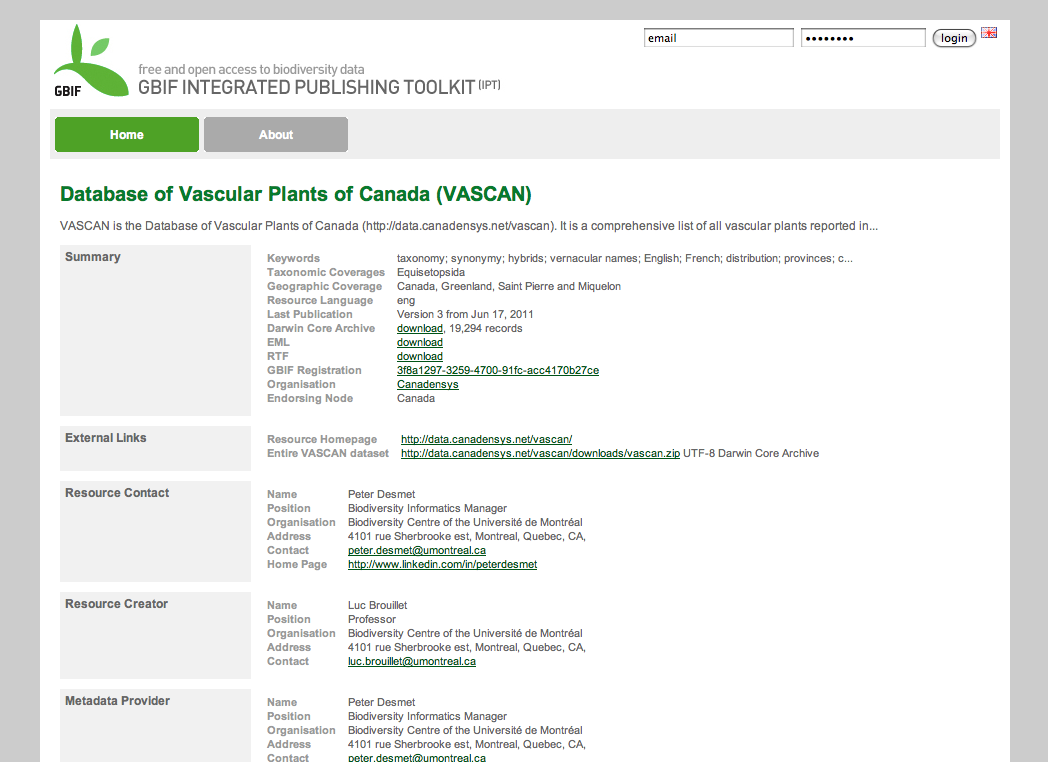
Our Canadensys community portal is powered by WordPress (MySQL, PHP), while our data portal - which before the IPT installation only consisted of the Database of Vascular Plants of Canada (VASCAN) - is a Tomcat application. We are using different technologies because we want to use the most adequate technology for a certain website. WordPress (or Drupal for that matter) is an excellent and easy-to-use CMS, perfect for our community portal, but not suitable for a custom made checklist website like VASCAN. To the user however, both websites look the same:


We do this by using the same HTML markup and CSS for both websites. If you want to learn HTML and CSS, w3schools provides excellent tutorials.

The HTML markup defines elements on a page (e.g. header, menu, content, sidebar, footer) and the CSS stylizes those elements (e.g. their position and color). The CSS is typically stored as one file (e.g. style.css) which is referenced in the <head> section of a page. For dynamic websites, the HTML is typically stored as different files, one for each section of a page (e.g. header.php, sidebar.php). Those files are combined as one page by the server if a page is requested. That way, changing a common element on all pages of a website (e.g. the header) can be done by changing just one file.

All of this also applies to the IPT. Here's how the IPT looks like without CSS:


Attempt 1 - Editing the CSS and logo

My first attempt at customizing the IPT was at the Experts Workshop in Copenhagen, by changing the CSS and logo only, which you can find in the /styles folder of your IPT installation:

/styles/main.css
/styles/logo.jpg

In 15 minutes, my IPT was Canadensys red and had a custom logo:


Attempt 2 - Editing the FreeMarker files

Even though my IPT now had its own branding, it was still noticeably different from the other Canadensys websites. The only way I could change that, was by editing the HTML as well. Luckily, the sections I wanted to change were all stored as FreeMarker files in the /inc folder:

/WEB-INF/pages/inc/header.ftl - the <head> section
/WEB-INF/pages/inc/menu.ftl - the header, menu and sidebar
/WEB-INF/pages/inc/footer.ftl - the footer
/WEB-INF/pages/inc/header_setup.ftl - the header during installation

I incorporated the HTML structure I use for the VASCAN website into menu.ftl (including the header, menu, container and sidebar), making sure I did not break any of the IPT functionality.

I started doing the same with main.css by replacing chunks of now unused IPT CSS with CSS I copied over from VASCAN, but I quickly realized that this wasn't the best option. Doing so would result in 2 CSS files: one for VASCAN and one for IPT, even though both web applications are under the same domain name with a lot of shared CSS. It would be easier if I only had to maintain a single stylesheet, used by both applications.

Attempt 3 - One styles folder for the data portal

I created a /common/styles folder under ROOT, where I placed my single common data portal stylesheet: /common/styles/common.css. This would be the CSS file I could use for IPT and VASCAN. I did the same for my favicon: /common/images/favicon.png.

I added a reference to both files in the header.ftl of my IPT (and VASCAN):

<link rel="stylesheet" type="text/css" href="${baseURL}/styles/main.css">
<link rel="stylesheet" type="text/css" href="http://data.canadensys.net/common/styles/common.css">
<link rel="shortcut icon" href="http://data.canadensys.net/common/images/favicon.png">

As you can see on the first line, I kept the reference to the default IPT stylesheet: ${baseURL}/styles/main.css (it's perfectly fine to reference more than one CSS file). This is where I would keep all the unaltered (=default) IPT CSS. In fact, I'm not removing anything from the default IPT stylesheet, I'm only commenting out the CSS that is unused or conflicting:

/* Unused or conflicting CSS */

The advantage of doing so, is that I now easily can compare this commented file with changes in the stylesheet of any new IPT version.

After I had done everything, my IPT now looked like this:


My IPT is now sporting the Canadensys header, footer and sidebar (only visible when editing a resource), making it indistinguishable from the other Canadensys websites. It is also using a more readable font-size (13.5px) and a fluid width.

Closing remarks

I have (re)designed quite a lot of websites, and very often I have been so frustrated with the HTML and CSS that I just started over from scratch. I didn't have that option here and it wasn't necessary either. I would like to thank the GBIF development team for creating such an easily customizable tool, with logical HTML and CSS. As a reminder, the whole customization has been done by editing only 5 files (links show default files):

/styles/main.css (custom file)
/WEB-INF/pages/inc/header.ftl
/WEB-INF/pages/inc/menu.ftl
/WEB-INF/pages/inc/footer.ftl
/WEB-INF/pages/inc/header_setup.ftl

Important: Remember that installing a new IPT version will overwrite all the customized files, so make sure to back them up! I will try to figure out a way to reapply my customization automatically after an update and post about that experience in a follow-up post. In the meantime, I hope that this post will help others in the customization of their IPT.

Monday, 18 July 2011

Working with Scientific Names

Dealing with scientific names is an important regular part of our work at GBIF. Scientific names are highly structured strings with a syntax governed by a nomenclatural code. Unfortunately there are different ones for botany, zoology, bacteria, virus and even cultivar names. When dealing with names we often do not know to which code or classification it belongs to, so we need to have a code agnostic representation as much as possible. GBIF came up with a structured representation which is a compromise focusing on the most common names, primarily the botanical and zoological names which are quite similar in its basic form.

The ParsedName class

Our ParsedName class provides us with the following core properties:
 genusOrAbove
infraGeneric
specificEpithet
rankMarker
infraSpecificEpithet
authorship
year
bracketAuthorship
bracketYear
These allow us to represent regular names properly. For example Agalinis purpurea var. borealis (Berg.) Peterson 1987 is represented as
 genusOrAbove=Agalinis
specificEpithet=purpurea
rankMarker=var.
infraSpecificEpithet=borealis
authorship=Peterson
year=1987
bracketAuthorship=Berg.
or the botanical section Maxillaria sect. Multiflorae Christenson as
 genusOrAbove=Maxillaria
infraGeneric=Multiflorae
rankMarker=sect.
authorship=Christenson
Especially in botany you often encounter names with authorships for both the species and some infraspecific rank or names citing more than one infraspecific rank. These names are not formed based on rules or recommendations from the respective codes and we ignore those superflous parts. For example Agalinis purpurea (L.) Briton var. borealis (Berg.) Peterson 1987 is represented exactly the same as Agalinis purpurea var. borealis above. In case of 4 parted names like Senecio fuchsii C.C.Gmel. subsp. fuchsii var. expansus (Boiss. & Heldr.) Hayek only the lowest infraspecific rank is preserved:
 genusOrAbove=Senecio
specificEpithet=fuchsii
rankMarker=var.
infraSpecificEpithet=expansus
authorship=Hayek
bracketAuthorship=Boiss. & Heldr.
Hybrid names are evil. They come in two flavors, named hybrids and hybrid formulas.
Named hybrids are not so bad and simply prefix a name part with the multiplication sign ×, the hybrid marker, or prefix the rank marker of infraspecific names with notho. Strictly this symbol is not part of the genus or epithet. To represent these notho taxa our ParsedName class contains a property called nothoRank that keeps the rank or part of the name that needs to be marked as with the hybrid sign. For example the named hybrid Pyrocrataegus ×willei L.L.Daniel is represented as
 genusOrAbove=Pyrocrataegus
specificEpithet=willei
authorship=L.L.Daniel
nothoRank=species
Hybrid formulas such as Agrostis stolonifera L. × Polypogon monspeliensis (L.) Desf., Asplenium rhizophyllum × ruta-muraria or Mentha aquatica L. × M. arvensis L. × M. spicata L. cannot be represented by our class. The hybrid formulas in theory can combine any number of names or name parts, so its hard to deal with them. Luckily they are not very common and we can afford to live with a complete string representation in those cases. Yet another "extension" to the botanical code are cultivar names, i.e. names for plants in horticulture. Cultivar names are regular botanical names followed by a cultivar name usually in english given in single quotes. For example Cryptomeria japonica 'Elegans'. To keep track of this we have an additional cultivar property, so that:
 genusOrAbove=Cryptomeria
specificEpithet=japonica
cultivar=Elegans
In taxonomic works you often have additional information in a name that details the taxonomic concept, the sec reference most often prefixed by sensu or sec. For example Achillea millefolium sec. Greuter 2009 or Achillea millefolium sensu latu. In nomenclatoral works one frequently encounters nomenclatoral notes about the name such as nom.illeg. or nomen nudum. Both these informations are hold in our ParsedName class, for example Solanum bifidum Vell. ex Dunal, nomen nudum becomes
 genusOrAbove=Solanum
specificEpithet=bifidum
authorship=Vell. ex Dunal
nomStatus=nomen nudum

Reconstructing name strings

The ParsedName class provides us with some common methods to build a name string. In many cases you dont want the complete name with all its details, so we offer some popular name string types out of the box and a flexible string builder that you can explicitly tell which parts you want to include. The most important methods are canonicalName(): builds the canonical name sensu strictu with nothing else but the three name parts at max (genus, species, infraspecific). No rank, hybrid markers or authorship information are included. fullName(): builds the full name with all details that exist. canonicalSpeciesName(): builds the canonical binomial in case of species or below, ignoring infraspecific information

The name parser

We decided at GBIF that sharing the complete name string is more reliable than trusting already parsed names. But parsing names by hand is a very tedious enterprise, so we needed to develop some parser that can handle the vast majority of all names that we encounter. After a short experimental phase with BNF and other grammars to automatically build a parser we decided to go back to start and start something based on good old regular expressions and plain java code. The parser has evolved now for nearly 2 years now and it might be the best unit tested class we have ever written at GBIF. It is interesting to take a look at the range of names we use for testing and also the test themseves to make sure its working as expected.

Parsing names

Using the NameParser in code is trivial. Once you create a parser instance all you need to do is call the parser.parse(String name) method to get your ParsedName object. As authorships are the hardest, ie most variable part of a name we have actually implemented two parsers internally. One that tries to parse the complete string and another fallback one that ignores authorships and only extracts the canonical name. The authorsParsed flag on a ParsedName instance tells you if the simpler fallback parser has been used. If a name cannot be parsed at all an UnparsableException is thrown. This is also the case for viral names and hybrid formulas, as the ParsedName class cannot treat these names. The exception itself actually has an enumerated property that you can use to know if the exception has been caused by a virus, hybrid or other name. As of today from 10.114.724 unique name strings that we have indexed only 116.000 names couldnt be parsed and these are mostly hybrid formulas.

Normalisation

Apart from the parse method the name parser also exposes a normalisation method to normalise any whitespace, commas, brackets and hybrid markers found in name strings. The parser uses this method internally before the actual parsing takes place. The string is trimmed, only single whitespace is allowed and spaces before commas are removed while it is enforced after a comma. Similar whitespace before opening brackets is added but removed inside. Instead of the proper multiplication sign for hybrids often a simple × followed by whitespace is used which is also replaced by this method.

Parsing Webservices

GBIF is offering a free webservice API to parse names using our name parser. We use JSON for the parsed results and it accepts single names as well as batches of names. For larger input data you have to use a POST request (GET requests are restricted in length), but for few names also a simple GET request with the names url encoded in the paramter "names" is accepted. Multiple names can be concatenated with the pipe | symbol. To parse the two names Symphoricarpos albus (L.) S.F.Blake cv. 'Turesson' and Pyrocrataegus willei ×libidi L.L.Daniel the parser service call looks like this: http://ecat-dev.gbif.org/ws/parser?names=Symphoricarpos%20albus%20(L.)%20S.F.Blake%20cv.%20'Turesson'|Stagonospora%20polyspora%20M.T.%20Lucas%20%26%20Sousa%20da%20Camara%201934 For manual usages we also provide a simple web client to this service that provides a form to enter names to be parsed and also accepts files with one name per line for upload. It is available as part of our tools collection at http://tools.gbif.org/nameparser/.

Source Code

All the code is part of a small java library that we call ecat-common. It is freely available under Apache 2 licensing as most of our GBIF work and you are invited to use our code at http://code.google.com/p/gbif-ecat/source/browse/trunk/ecat-common/, download the latest jar from our maven repository or include it in your maven dependencies like this:
 <repositories>
<repository>
<id>gbif-all</id>
<url>http://repository.gbif.org/content/groups/gbif</url>
</repository>
</repositories>
<dependencies>
<dependency>
<groupId>org.gbif</groupId>
<artifactId>ecat-common</artifactId>
<version>1.5.1-SNAPSHOT</version>
</dependency>
</dependencies>

Friday, 8 July 2011

Are you the keymaster?


As I mentioned previously I'm starting work on evaluating HBase for our occurrence record needs.  In the last little while that has meant coming up with a key structure and/or schema that optimizes reads for one major use case of the GBIF data portal - a user request to download an entire record set, including raw records as well as interpreted.  The most common form of this request looks like "Give me all records for ", eg "Give me all records for Family Felidae".

So far I'm concentrating more on the lookup and retrieval rather than writing or data storage optimization, so the schema I'm using is two column families, one for verbatim columns, one for interpreted (for a total of about 70 columns).  The question of which key to use for HTable's single indexed column is what we need to figure out.  For all these examples we assume we know the backbone taxonomy id of the taxon concept in question (ie Family Felidae is id 123456).

Option 1
Key: native record's unique id

Query style: The simplest way of finding all records that belong to Family Felidae is scan all of them, and check against the Family column from the interpreted column family.  The code looks like this:

    HTable table = new HTable(HBaseConfiguration.create(), tableName);
    byte[] cf = Bytes.toBytes(colFam);
    byte[] colName = Bytes.toBytes(col);
    byte[] value = Bytes.toBytes(val);

    Scan scan = new Scan();
    ResultScanner scanner = table.getScanner(scan);

    for (Result result : scanner) {
      byte[] testVal = result.getValue(cf, colName);
      if (Bytes.compareTo(testVal, value) == 0) doSomething;

    }

Because this means transferring all columns of every row to the client before checking if it's even a record we want, it's incredibly wasteful and therefore very slow.  It's a Bad Idea.

Option 2
Key: native record's unique id

Query style: HBase provides a SingleColumnValueFilter that executes our equality check on the server side, thereby saving the transfer of unwanted columns to the client.  Here's the code:

    HTable table = new HTable(HBaseConfiguration.create(), tableName);
    byte[] cf = Bytes.toBytes(colFam);
    byte[] colName = Bytes.toBytes(col);
    byte[] value = Bytes.toBytes(val);

    SingleColumnValueFilter valFilter = new SingleColumnValueFilter(cf, colName, CompareFilter.CompareOp.EQUAL, value);
    valFilter.setFilterIfMissing(true);

    Scan scan = new Scan();
    scan.setFilter(valFilter);
    ResultScanner scanner = table.getScanner(scan);


This is about as good as it gets until we start getting clever :)

Option 3
Key: concatentation of nub-taxonomy "left" with native record's unique id

Query style:  We know that a taxonomy is a tree, and our backbone taxonomy is a well behaved (ie true) tree.  We can use nested sets to make our "get all children of node x" query much faster, which Markus realized some time ago, and so thoughtfully included the left and right calculation as part of the backbone taxonomy creation.  Individual occurrences of the same taxon will share the same backbone taxonomy id, as well as the left and right.  One property of nested sets not mentioned in the wikipedia article is that when the records are ordered by their lefts, the query of "give me all records where left is between parent left and parent right" becomes "give me all rows starting with parent left and ending with parent right", which in HBase terms is much more efficient since we're doing a sequential read from disk without any seeking.  So we build the key as leftId_uniqueId, and query as follows (note that startRow is inclusive and stopRow is exclusive, and we want exclusive on both ends):


    HTable table = new HTable(HBaseConfiguration.create(), tableName);
    Scan scan = new Scan();
    scan.setStartRow(Bytes.toBytes((left + 1) + "_"));
    scan.setStopRow(Bytes.toBytes(right + "_"));

    ResultScanner scanner = table.getScanner(scan);

Which looks pretty good, and is in fact about 40% faster than Option 2 (on average - depends on the size of the query result).  But on closer inspection, there's a problem.  By concatenating the left and unique ids with an underscore as separator, we've created a String, and now HBase is doing its usual lexicographical ordering, which means our rows aren't ordered as we'd hoped.  For example, this is the ordering we expect:

1_1234
2_3458
3_3298
4_9378
5_3435
10_5439
100_9763

but because these are strings, HBase orders them as:

1_1234
10_5439
100_9763
2_3458
3_3298
4_9378
5_3435

There isn't much we can do here but filter on the client side.  For every key, we can extract the left portion, convert to a Long, and compare it to our range, discarding those that don't match.  It sounds ugly, and it is, but it doesn't add anything appreciable to the processing time, so it would work.

Except that there's a more fundamental problem - if we embed the left in our primary key, it only takes one node added to the backbone taxonomy to force an update in half of all the lefts (on average) which means all of our primary keys get rewritten.  At 300 million records and growing, that's not an option.

Option 4
Key: native record's unique id
Secondary index: left to list of unique ids

Query style: Following on from Option 3, we can build a second table that will serve as a secondary index.  We use the left as a numeric key (which gives us automatic, correct ordering) and write each corresponding unique occurrence id as a new column in the row.  Then we can do a proper range query on the lefts, and generate a distinct Get for each distinct id.  Unfortunately building that index is quite slow, and is still building as I write this, so I haven't been able to test the lookups yet. 

For those keeping score at home, I'm using Hbase 0.89 (from CDH3b4) which doesn't have built in secondary indexes (which 0.19 and 0.20 did).

I'll write more when I've learned more, and welcome any tips or suggestions you might have to aid in my quest!


Thursday, 30 June 2011

The organisational structure and the endorsement process - if you're an IPT administrator

During the Expert Workshop last week in Copenhagen, we had a session talking about configuring IPT to reflect different organisational structures. I think it's worth to explain about that part as a blog post here, since some of our readers would like to help deploy IPT in the GBIF Network. It's usually started by questions like this:

Why am I asked for a password of the organisation that I choose to register IPT? Why am I asked again when I want to add an additional organisation?

The short answer is, by having the password of the organisation, that means you have got the permission from that organisation and the organisation is aware of the fact that you're registering an IPT against it.

So, why is this the way of registering an organisation?

The organisational structure

Remember the GBIF Network is not only a common pool of sharing biodiversity data, to form such a pool, it's also the social network in which biodiversity data publishers interact. IPT, serves as the technical skeleton of the network, needs to tie to the organisational structure in order to properly accredit institutions or individuals, by helping to reflect those relationships among the organisations, hosted resources, IPTs and endorsing GBIF nodes/participants. The relationship can be seen on the GBIF Registry.

Take VertNet Hosting as an example. VertNet Hosting is an IPT installation that hosts data resources authored by those users in the IPT. In the second half of its page on the Registry, you see:

VertNet Hosting publishes uafmc_fish
University of Kansas Biodiversity Research Center has technical installation VertNet Hosting

Which means, this IPT has a public resource called uafmc_fish, which has been registered to the GBIF Network, and this IPT is registered against University of Kansas Biodiversity Research Center, which is the hosting organisation of IPT.

If you click the uafmc_fish link in the Registry page, it says:

University of Arkansas Collections Facility, UAFMC has data resource uafmc_fish

That means the uafmc_fish resource has been registered against University of Arkansas Collections Facility, UAFMC, which should have been added to the VertNet hosting IPT to be available for users to choose from, other than University of Kansas Biodiversity Research Center.

So the administrator of the VertNet Hosting IPT, in this case Ms. Laura Russell, had been asked twice the different passwords she needed to register her IPT and add another organisation.

The activities can be summarised as this graphic:

Which says, with Vertnet Hosting (IPT) registered against University of Kansas Biodiversity Research Center, uafmc_fish can be hosted by the IPT but tied to University of Arkansas Collections Facility, UAFMC. This means an organisation doesn't necessarily need to have the capacity to install IPT in order to host published resources. Any other IPT, with the agreement of hosting organisations, can host resources of others. This is why here the password is required.

The relationships of these units then are reflected on the Registry as:

By this design the relationship and accreditation of the GBIF Network is maintained.

Now, beyond these graphics, if you click University of Kansas Biodiversity Research Center and University of Arkansas Collections Facility, UAFMC in the Registry, you'll these two statements individually in each page:

USA endorses University of Kansas Biodiversity Research Center
USA endorses University of Arkansas Collections Facility, UAFMC

That means, these 2 organisations are endorsed by USA, which is a member of GBIF, and since they are endorsed, they are therefore available in the organisation drop-down list of IPT.

The endorsement process

Chances are, you're looking for your organisation in that list and you are pretty sure it's not there. What should you do?

Either you're registering IPT, or one of your user is requesting an organisation that is not available yet, you should try talk to administration level people and seek to get endorsed by a GBIF member. Normally, ➊ you or the representative of your institution write to helpdesk@gbif.org, provide some background information and at least a technical contact, ➋ the helpdesk will look for appropriate node for you to get endorsed. Upon ➌ positive feedbacks from an endorsing node, ➍ the helpdesk will inform you the availability of your organisation and the password.

This process runs administratively because we rely on the social level to ensure the responsibility for the registered IPT and published resources. This also makes the accreditation goes to correct persons or organisations.

Hope this helps IPT experts.